
- Before mounting write down the 6-digit PIN number on the side of the charger (In my case it was on a white sticker on the side with the Remote plug-in andBluetooth light) I also wrote the number on the front of the Charger where it wasreadable in the truck and put it in my iPhone notes! (You can change the PIN under Settings/Product info if you would like, you just have to write it down and remember it!)
- Download the VictronConnect app onto your phone
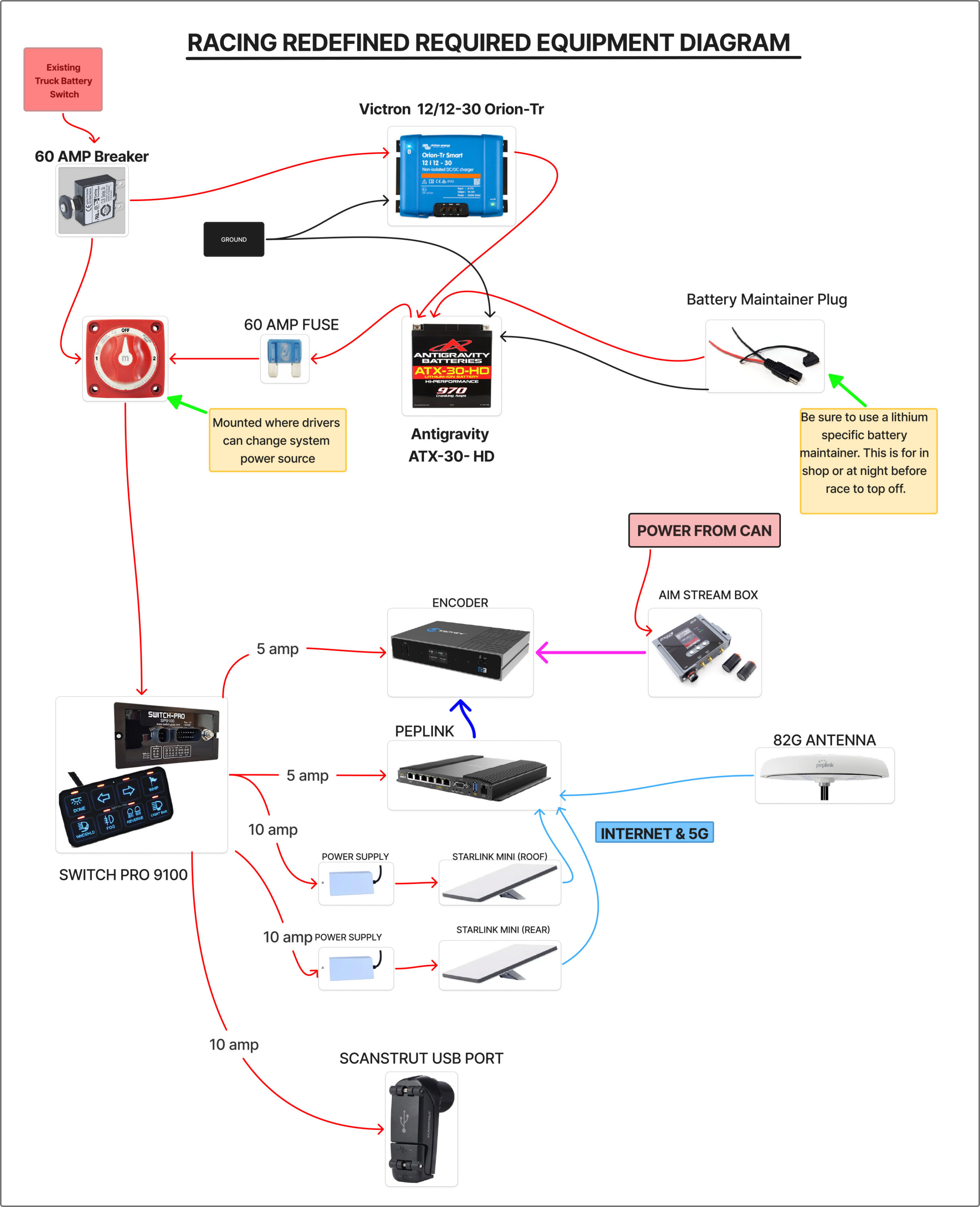
- Mount the charger and only connect the Positive and Negative wire from the Race Truck to the Input + and – on the front of the charger.
- As soon as you add power to the charger you should see the Bluetooth light start blinking and you can connect to it with the VictronConnect app on your phone.
- First thing to do in the APP is go to the Settings (gear symbol top right) then click on the 3 Vertical dots in the same upper right corner, then Product info. In here please change the Custom Name to Race followed by your truck number. In this case mine is named Race94.
- Right below Custom Name in the Product Info tab is Firmware. Please make sure you are at least v1.13. You can update right there next to it. It takes about 30 seconds to a minute and you must keep your phone app open with no disruption.
- Back one tab under Settings you will need to click on the box that says Power Supply (next to Function). Then change that to Charger.
- Battery Settings– We are running the AntiGravity Lithium Battery so I left the Battery Settings at the factory default Smart Lithium
- Engine Shutdown Protection– these settings are what will turn the charger on/off when the vehicle is started and shut off. Each race truck will be a little different depending on engine package, alternators, and pulley size. I used a multimeter to measure the voltage on the vehicle batteries at rest, then while running, then again when shut off after running for a bit. Here are the numbers we are using
- Alternator Type– User Defined
- Start Voltage– 13.00v
- Delayed Start Voltage– 12.80v
- Delayed Start Voltage Delay– 60s
- Shutdown Voltage– 12.60v
- Input Voltage Lock-Out– These are the absolute hardsets where the charger will shut off and isolate from main vehicle battery. When setup with these numbers if the truck voltage falls below 11.8v the charger will shut off until it reaches 12.2v again.
- Lock-Out Value– 12.0v
- Restart Value– 12.2v
- Connect the leads from the Auxiliary Battery to the Output + and – on the Charger. Note that the two Positive terminals are on the outsides and the two Negatives are in the middle. Reversing the Polarity of either will fry the unit!!
- Plug in the Green Jumper into the Remote plug.
- Your Charger is now ready to charge and may start charging if your vehicle battery is high enough!
A few side notes:
- The Charger seems to react fast on start-up, once it sees 13.00v it starts charging immediately. However, on shut-down it seems to have a 30 second or so delay before it stops charging.
- If you turn off the Engine Shut Down Detection feature and then decide to turn it back it reverts all the voltages entered back to Factory Default and you must re- renter all the User Defined voltages.
- If you are scared about using the auto shut down detection feature and when it turns on and off the charger, you can disable this feature under Settings, Remove the jumper wire on the Green Remote plug and run a switch from ground to the ‘L’terminal. YOU MUST REMEMBER TO TURN THE SWITCH ON AND OFF!!!!!!!

2 Min Read